
Setting the auto-start time on a Cuisinart takes about two minutes. You press Program, set the hour and minute you want the coffee ready, then press Program again to lock it in. The clock has to be set first, and the machine has to stay plugged in — unplug it and the whole thing clears.
How to Set the Timer Step by Step
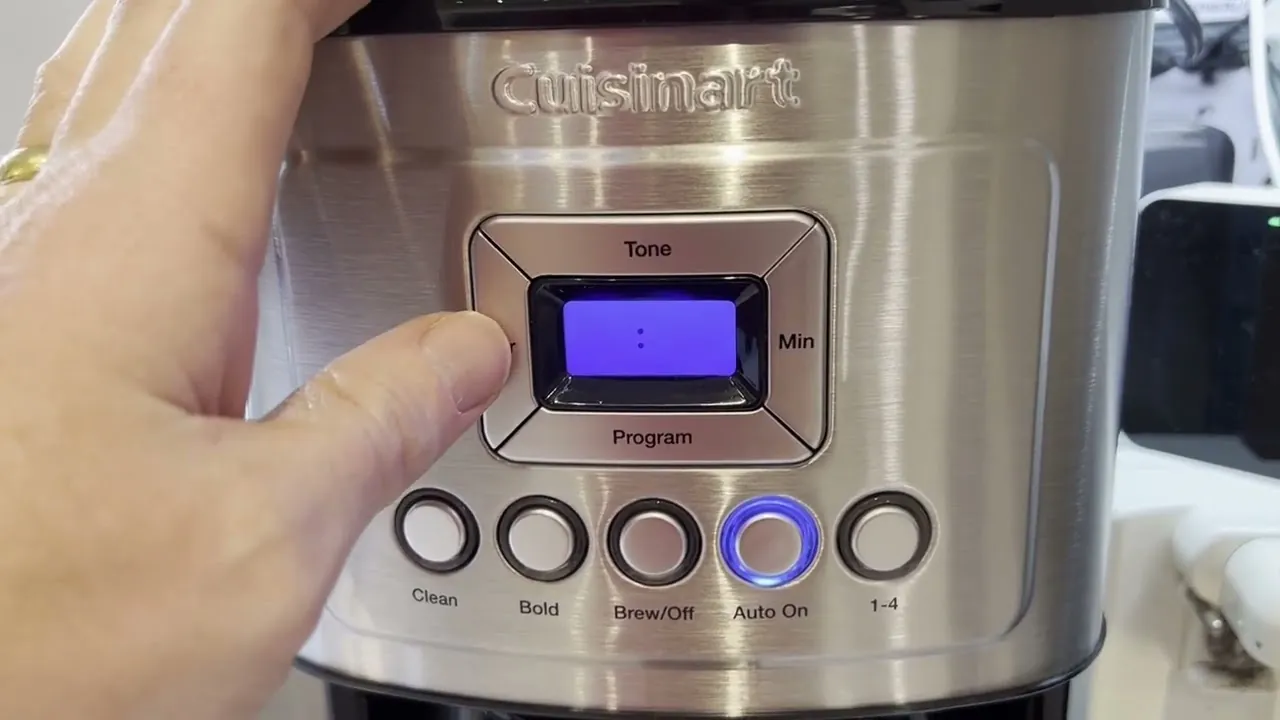
Every Cuisinart drip machine with a timer uses the same basic buttons: Program, Hour, Minute, and On/Off. The order below covers the standard 12-cup and 14-cup models, including the grind-and-brew versions.
- Set the clock before anything else. Press and hold Hour until the display shows the correct time, then do the same with Minute. If AM or PM is wrong, keep pressing Hour until it flips — the small letters matter here.
- Press Program once. The display starts blinking and shows a small “1” or the word “PROGRAM.” You’re now editing the auto-start time, not the clock.
- Press Hour to set your brew hour. Each press moves it forward by one. Hold the button to scroll faster if you’re setting something early in the morning.
- Press Minute to set the exact minute. Match it to when you actually want coffee in the carafe, not when you wake up.
- Press Program again to save. The display stops blinking. If it keeps flashing, the time isn’t locked and the machine will ignore it.
- Press the Auto On button if your model has one. On some Cuisinarts the timer only arms when you press this separate button and a small light comes on.
- Load the basket and water the night before. Ground coffee in the filter, water in the reservoir, carafe sitting flat on the plate.
- Leave the machine plugged in. The timer runs off the display clock, and a long power cut can wipe both.
Tip: Set the start time 5 to 10 minutes earlier than you need it. The brew itself takes time, so a 7:00 a.m. start usually means coffee around 7:12.
How Long Does It Take to Set the Timer?
The button work takes about 2 minutes on most models. What takes longer is the brewing that follows: a full 12-cup pot runs roughly 10 to 15 minutes from the moment the timer fires, and a 14-cup pot sits at the top of that range.
The exact brew time depends on how much water you loaded and how many cups you asked for. A half pot finishes faster than a full one, so if you set 4 cups instead of 12, expect the cycle to end sooner.
| What you’re setting | Time it takes | What changes it |
|---|---|---|
| Clock | About 30 seconds | How far you have to scroll |
| Auto-start time | About 1 minute | Whether the display is already blinking |
| Full 12-cup brew | 10–15 minutes | Water volume, grind size |
| Full 14-cup brew | 12–15 minutes | Water volume, grind size |
| Half pot (4–6 cups) | 6–10 minutes | Water volume |
If you want coffee the moment you walk into the kitchen, set the auto-start for 15 minutes before your alarm. That covers the brew and gives the pot a few minutes to settle.
Why Your Timer Didn’t Start the Coffee
The most common reason a Cuisinart timer doesn’t fire is that the machine lost power at some point — a flipped breaker, a bumped plug, a power strip switched off. The clock resets to 12:00 and the saved start time disappears with it.
The second most common reason is that the timer was never armed. On models with a separate Auto On button, pressing Program alone saves the time but doesn’t switch the timer on. You need that second press, and you need to see the indicator light.
Here’s the quick version:
| Symptom | Most likely cause | What to do |
|---|---|---|
| Clock shows 12:00 | Power was interrupted | Reset clock, then reset the timer |
| Time saved but no brew | Auto On never pressed | Press Auto On, check the light |
| Brews at the wrong hour | AM/PM set backwards | Reset the hour, watch the AM/PM marker |
| Timer works some days only | Loose plug or shared outlet | Move to its own outlet, push the plug in fully |
Checks to Run Before You Trust the Timer
Before you go to bed expecting coffee, spend 30 seconds on these. They catch almost every failed brew.
- Look for the AM/PM marker. A 7:00 setting means two different things depending on that tiny letter. This is the single most common setup error.
- Check the carafe is seated flat. A carafe pushed in at an angle may not press the pause-and-serve lever, so coffee can overflow or spill instead of flowing into the carafe.
- Confirm the lid is closed. On grind-and-brew models, an open lid stops the cycle before it begins.
- Check the water reservoir is above the minimum line. Running the machine with too little water can damage the heating element, so keep the reservoir filled.
- Make sure the outlet isn’t on a switch. A wall switch that controls the outlet will kill your timer every time someone flips it.
- Give the machine a clean filter basket. A clogged basket slows the brew and can leave you with a half-full pot.
Tip: Test the timer once during the day before relying on it overnight. Set it for 10 minutes ahead, watch it fire, and you’ll know the setup is right.
When to Reset, Repair, or Replace
If the clock keeps resetting to 12:00 on its own, the machine is losing power internally — that’s a job for a repair shop or Cuisinart support, not something to open up yourself. Anything inside the housing involves mains voltage, and that work belongs to a qualified technician.
If the timer saves correctly but the brew never starts, and you’ve checked the Auto On button, the outlet, and the standby mode, the control board is the likely culprit. On most Cuisinart drip machines, a board replacement costs a large share of a new machine, so replacement usually makes more sense than repair.
If the timer works but the coffee tastes weak or the pot comes out half full, that’s a cleaning or grind problem, not a timer problem. Descale the machine and check your grind size before you spend money on anything.
Frequently Asked Questions
Does the Cuisinart timer work if the power goes out?
No. The timer runs off the display clock, and a power cut clears both. When the power comes back, the clock shows 12:00 and your saved start time is gone. You’ll need to set the clock and the auto-start again.
Can I set the timer for more than 12 hours ahead?
Yes, on most models. The timer works on a 12-hour cycle, so you set the hour and the AM/PM marker to match. Setting it 14 hours ahead just means picking the right AM or PM. Just remember the machine has to stay plugged in the whole time.
Why does my Cuisinart beep but not brew?
A beep with no brew usually means the machine accepted the setting but the heating cycle never started. Check that the carafe is seated, the lid is closed, and the reservoir has enough water. On grind-and-brew models, an empty bean hopper means the cycle runs with no coffee in the basket.
Do all Cuisinart coffee makers have a timer?
No. Timer and auto-start features appear on the programmable drip models and the grind-and-brew machines. Basic models without a digital display have no timer at all — there’s no clock to set. Check your model’s display before assuming the feature exists.
Can I change the timer while coffee is brewing?
You can press the buttons, but the change usually won’t take effect until the current cycle ends. Wait for the brew to finish, then set the new time. Editing mid-brew can also cancel the auto-start you already saved.
What time should I set for coffee when I wake up?
Set the start time for 10 to 15 minutes before your alarm. A full pot takes 10 to 15 minutes to brew, so this puts fresh coffee in the carafe right as you get up. For a half pot, 8 minutes ahead is usually enough.
Conclusion
Once your timer is set and tested, the next thing worth doing is a descale — mineral buildup slows the brew and can make the timer look broken when it isn’t. Check your manual for how often your water hardness calls for it, and run a cleaning cycle before the problem shows up in your cup.