
Have you ever placed your food on your digital kitchen scale, only to get a confusing number? It’s frustrating when your scale doesn’t give you the right reading.
But don’t worry—you can fix this quickly by resetting your digital kitchen scale. In this guide, you’ll learn simple steps to reset your scale and get accurate measurements every time. Keep reading, and you’ll never have to guess your ingredients again.
Preparing Your Scale
Preparing your digital kitchen scale is the first step before resetting it. Proper preparation helps the scale work correctly. It also avoids errors during the reset process.
Follow these simple steps to get your scale ready for resetting.
Check Batteries
Start by checking the batteries in your scale. Weak or dead batteries cause wrong readings. Replace old batteries with fresh ones. Use the type recommended by the manufacturer. This ensures the scale gets enough power for accurate measuring.
Clean The Surface
Remove any dust or food particles on the scale’s surface. Use a soft, damp cloth to wipe it gently. Avoid harsh chemicals or soaking the scale. A clean surface helps the scale measure weight correctly. Dirt can block the sensors and cause errors.
Place On A Flat Surface
Put the scale on a flat, hard surface. Avoid soft or uneven areas like carpets or mats. A stable surface prevents the scale from tipping or giving false readings. Make sure the scale does not move during use. This step is important for accurate results.
Credit: adelaideepic.org
Basic Reset Methods
Basic reset methods help fix simple issues with digital kitchen scales. These methods are easy to follow and do not need special tools. They often solve problems like incorrect readings or unresponsive screens. Try these first before considering more complex fixes.
Using The Reset Button
Many digital kitchen scales have a reset button. This button clears errors and resets the scale to factory settings. Locate the button on the back or bottom of the scale. Press and hold it for a few seconds. Release the button and wait for the scale to restart. The scale should now work normally.
Power Cycling The Scale
Power cycling means turning the scale off and on again. This simple action can fix many glitches. First, switch off the scale. Remove the batteries or unplug it. Wait for about one minute to clear any stored power. Insert the batteries or plug it back in. Turn the scale on and check if it works correctly.
Calibration Steps
Calibration ensures your digital kitchen scale measures weight accurately. Follow these simple steps to reset and calibrate your scale. Proper calibration helps maintain precision for cooking and baking.
Enter Calibration Mode
Turn on your digital kitchen scale. Wait until the display shows zero. Press and hold the calibration button. This button might say “Cal,” “Mode,” or “Func.” Release the button when the display changes. Your scale is now in calibration mode.
Use Calibration Weights
Place the correct calibration weight on the scale. Use a standard weight if possible, like 100 grams or 200 grams. The scale will recognize the weight and adjust itself. Avoid using random objects for calibration. Accurate weights ensure precise results.
Confirm Calibration
Wait for the scale to stabilize. The display will show a confirmation message or beep. Remove the calibration weight carefully. Check if the scale returns to zero. Your digital kitchen scale is now calibrated and ready to use.

Credit: shop.greatergoods.com
Troubleshooting Tips
Troubleshooting your digital kitchen scale can save time and hassle. Small issues often cause common problems. Fixing these can restore your scale’s accuracy and function quickly.
Scale Not Turning On
Check the battery first. Replace old or weak batteries with new ones. Make sure the battery is inserted correctly. Clean the battery contacts gently to remove dirt or rust. Press the power button firmly for a few seconds. If it still does not turn on, try resetting the scale by removing the battery for a minute. Then, reinsert and try again.
Inaccurate Readings
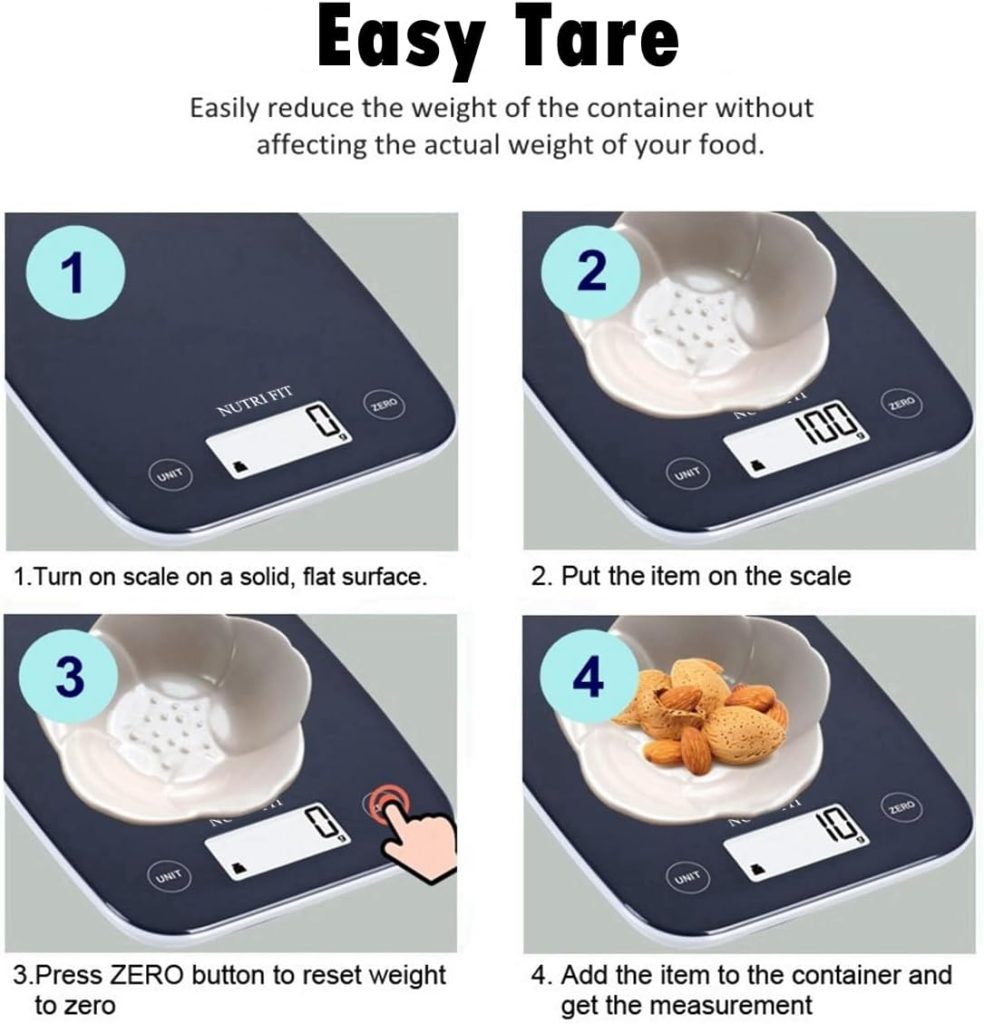
Place the scale on a flat, hard surface. Avoid soft or uneven tables. Zero or tare the scale before weighing. Remove any items on the scale before turning it on. Avoid weighing hot or cold items directly. Calibrate the scale if it has a calibration option. Follow the user manual steps carefully for calibration.
Display Issues
Check the display for cracks or damage. Clean the screen with a soft, dry cloth. Avoid using water or chemicals on the display. Restart the scale to reset the display. If the screen shows strange symbols or blanks, replace the battery. If problems continue, the display might need professional repair or replacement.
Maintaining Your Scale
Keeping your digital kitchen scale in good shape helps it work well for a long time. Small steps can prevent errors and keep your scale accurate. Proper care also avoids damage and extends its life. Focus on cleaning, battery care, and storage.
Regular Cleaning
Wipe the scale after each use. Use a soft, damp cloth to remove food crumbs and spills. Avoid harsh cleaners or soaking the scale. Clean the surface gently to keep sensors working right. Dry the scale fully before using or storing.
Battery Replacement
Check the battery level often. Replace batteries if the scale shows low power signs. Use the right battery type suggested in the manual. Remove batteries if you will not use the scale for a long time. Proper battery care prevents leaks and damage.
Storage Advice
Store the scale in a dry, cool place. Keep it away from direct sunlight and heat. Avoid heavy items on top of the scale to prevent damage. Store the scale flat to keep sensors aligned. Proper storage keeps your scale ready to use anytime.

Credit: www.amazon.com
Frequently Asked Questions
How Do I Reset My Digital Kitchen Scale?
To reset, turn off the scale and remove the batteries. Wait for 2 minutes, then reinsert batteries and power it on. This resets the device to factory settings and clears any errors or calibration issues.
Why Is My Digital Kitchen Scale Not Resetting?
Your scale may have a locked tare function or need new batteries. Check the manual for a reset button or combination. Replace old batteries as low power can prevent resetting.
Can I Recalibrate After Resetting The Scale?
Yes, recalibration is essential after resetting. Use a known weight, like a calibration stone or packaged item. Follow the scale’s calibration instructions to ensure accurate measurements.
What Causes Digital Kitchen Scales To Need Resetting?
Scales often need resetting due to battery changes, sensor errors, or software glitches. Regular use and spills can also disrupt settings, requiring a reset to restore accuracy.
Conclusion
Resetting your digital kitchen scale is simple and quick. Just follow the steps carefully. This helps keep your measurements accurate every time. A well-calibrated scale makes cooking and baking easier. Avoid guessing ingredients and save money by measuring right. Keep your scale clean and store it properly for longer use.
Regular checks help your scale work well always. Now, you can trust your scale for every recipe. Enjoy cooking with confidence and precise results!